
We value your privacy
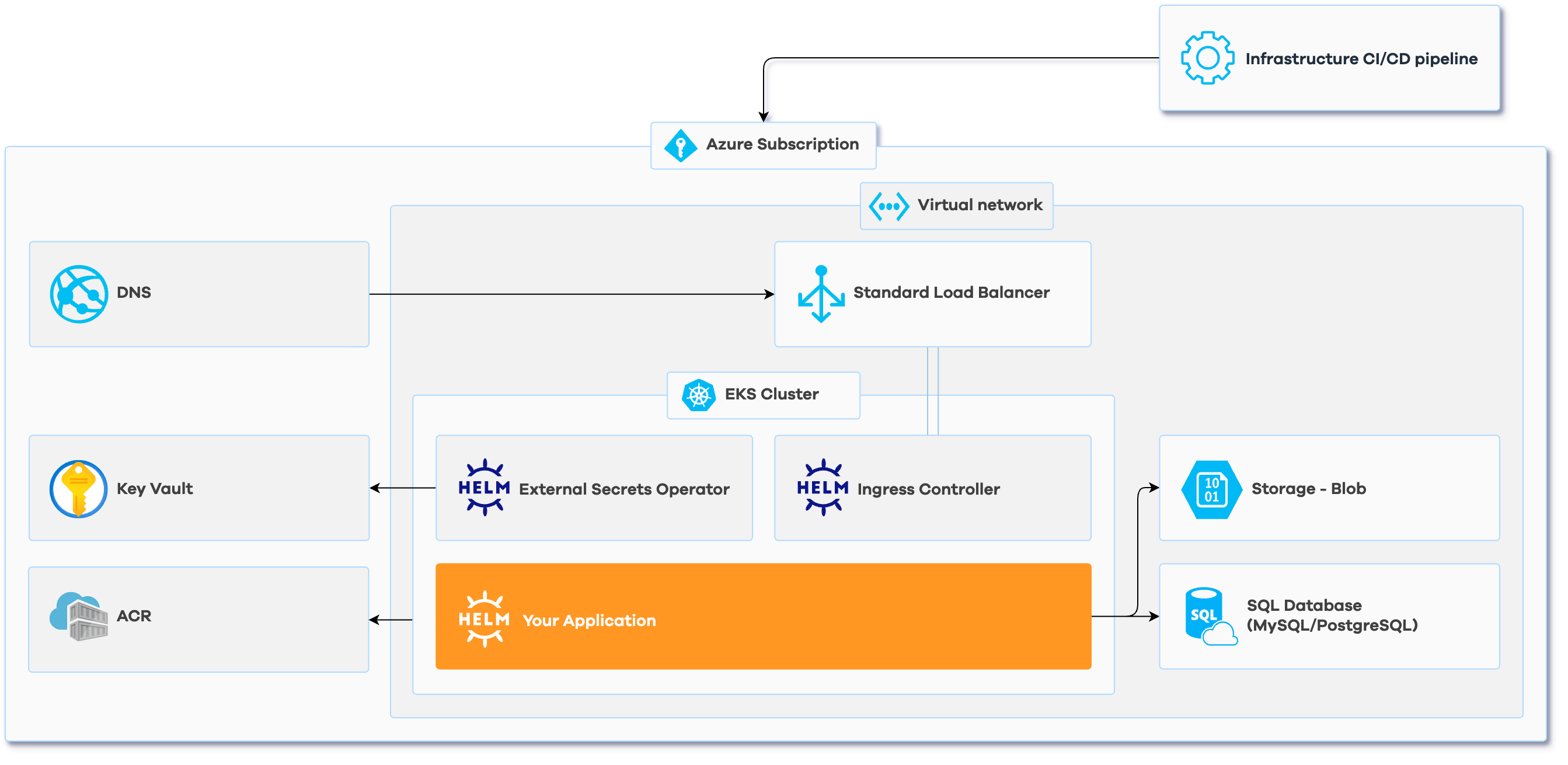
| Components | |
|---|---|
| Azure Container Registry | |
| Azure Kubernetes Cluster | |
| Azure Virtual Network | |
| Kubernetes ESO for Azure KV | |
| DNS Management |
Azure DNS
|
| Infrastructure CI/CD pipeline |
Drone CI
|
| Ingress Controller |
Nginx
|
| Object Storage |
B2 Buckets
|
| SQL Database | MySQL/PostgreSQL |
| Helm Chart | |
| Setup by Corewide team | |
| Post-implementation training | |
| 2-week warranty support | |
| Documentation |
Once you have a Corewide Solutions Portal account, this one-time action will use your browser session to retrieve credentials:
shellterraform login solutions.corewide.com
Download Infrasnap archive from My Library page, unpack it to a new directory and initialize a new project there:
 shellcd infrasnap/
git init
git add .
Follow the instructions in README.md:
terraform.tfvars, or using environment variables)
infrasnap.yml parameters based on the reference belowbackend.tf
Initialize the setup, create the environment you configured in infrasnap.yml and
provision
the infrastructure:
 shellterraform init
terraform workspace new <environment_name>
terraform workspace select <environment_name>
terraform apply
| Variable | Description | Type | Default | Required | Sensitive |
|---|---|---|---|---|---|
project_name |
Project name to use for resource naming | string |
yes | no | |
arm_client_id |
Azure RM Client ID. This can also be sourced from the ARM_CLIENT_ID Environment Variable |
string |
no | no | |
arm_client_secret |
Azure RM Client Secret. This can also be sourced from the ARM_CLIENT_SECRET Environment Variable |
string |
no | yes | |
arm_subscription_id |
Azure RM Subscription ID. This can also be sourced from the ARM_SUBSCRIPTION_ID Environment Variable |
string |
no | no | |
arm_tenant_id |
Azure RM Tenant ID. This can also be sourced from the ARM_TENANT_ID Environment Variable |
string |
no | no | |
config |
Infrasnap configuration data | any |
{} |
no | no |
config_file |
Path to a YAML file with Infrasnap configuration data | string |
./infrasnap.yml |
no | no |
| Variable | Description | Type | Default |
|---|---|---|---|
arm_subscription_id |
Azure RM subscription to place resources into. Leave it blank to use the common one from the arm_subscription_id variable |
string |
|
region |
Azure region to place the resources into | string |
eastus |
vnet_cidr |
CIDR block for VNet of this environment | string |
172.18.0.0/16 |
container_registry_workspace |
Environment where container registry must be created. Leave blank to not create at all if a third-party registry is used instead | string |
default |
container_registry_kubernetes_access |
Container registry access permissions. Must be either ro (read-only) or rw (read-write) |
string |
ro |
k8s_version |
Kubernetes engine version to deploy the cluster with | string |
1.34 |
k8s_default_node_pool_node_size |
Machine type to use for all nodes in the default node pool | string |
Standard_D2_v2 |
k8s_default_node_pool_max_size |
Maximum number of nodes in the default node pool (for autoscaling) | number |
2 |
k8s_node_pools |
List of Kubernetes node pool definitions | list |
|
k8s_node_pools[*].name |
Name of the node pool to create | string |
app |
k8s_node_pools[*].node_size |
Machine type to use for all nodes in this node pool | string |
Standard_D2_v2 |
k8s_node_pools[*].max_size |
Maximum number of nodes in the node pool (for autoscaling) | number |
3 |
dns_zone_create |
Whether to create DNS zone or use the existing one | bool |
false |
dns_zone |
DNS zone in which to create records, disable to reuse the same zone from another workspace | string |
example.com |
dns_records_k8s |
A list of subdomains that must point at Ingress LoadBalancer | list |
|
dns_records |
List of extra records that do not point at Ingress LoadBalancer. See module_docs for complete reference. Note: when adding CNAME record in the same dns_zone, supply full dns record value e.g. value.dns_zone. |
map |
|
dns_records.test |
Name of the DNS record | map |
|
dns_records.test.type |
Record type (A, AAAA, CNAME, MX, NS, or TXT) |
string |
CNAME |
dns_records.test.value |
List of values for the record | list |
['test.example.com'] |
dns_records.test.ttl |
Time to Live (TTL) of the record in seconds | number |
31 |
dns_records.test.priority |
The priority of the record (only for MX type) |
number |
3600 |
cert_manager_email |
E-mail that Let's Encrypt cluster issuer will use to request certificates | string |
[email protected] |
buckets |
Buckets definitions to create | map |
|
buckets.my-bucket |
Bucket name | map |
|
buckets.my-bucket.access_mode |
B2 bucket access mode. Allowed values: private, public-read |
string |
private |
buckets.my-bucket.enable_default_encryption |
Enable default bucket server-side encryption (SSE-B2/AES256) | bool |
true |
sql_database_engine |
Database engine. Supported values are: MySQL and PostgreSQL |
string |
PostgreSQL |
sql_database_engine_version |
Flexible server instance engine version | number |
16 |
sql_database_machine_size |
Node size for the flexible server | string |
GP_Standard_D2ds_v4 |
sql_database_disk_size |
Size of flexible server instance disk | number |
32 |
sql_databases_list |
List of databases to create | list |
| Output | Description | Type | Sensitive |
|---|---|---|---|
app_namespace |
Kubernetes namespace to deploy the application to | attribute |
no |
cluster_connection_cli |
CLI command to connect to the cluster | computed |
no |
container_registry |
Container registry to push container images to | computed |
yes |
eso_cluster_secret_store_name |
Name of Kubernetes ClusterSecretStore resource to be used in creation of ExternalSecret resources |
attribute |
no |
registry_connection_cli |
CLI command to authenticate to the container registry | computed |
no |
name_servers |
Name servers of DNS zone managed in this workspace | attribute |
no |
bucket_names |
List of bucket names | list(attribute) |
no |
flexible_server_connection_secret_name |
Name of Key Vault secret with flexible server connection parameters | attribute |
no |